
What it is for #
The VPN allows access, even remotely, to databases and other reserved services, protecting the digital resources of the University and limiting their use when not connected to the UniPi network.
Requirements to use the University VPN #
To use the VPN service, you must verify that it is activated on Identity by selecting the Services menu item.
How to install the VPN #
- For PC and Mac
Download the program SonicWALL Connect Tunnel for your operating system.
On Mac/Linux, you need to have Java already installed. Mac users who prefer to avoid Java can download the SonicWALL Mobile Connect app directly from the Apple Store. - For Smartphone/Tablet
- Android: Download the SonicWALL Mobile Connect app from the Google Play Store.
- iOS: Download the SonicWALL Mobile Connect app from the Apple Store.
Set up a VPN connection #
The server for the VPN connection is called [access.unipi.it] and can be configured in the Connect Tunnel program with a few simple steps.
1. Add a new configuration #
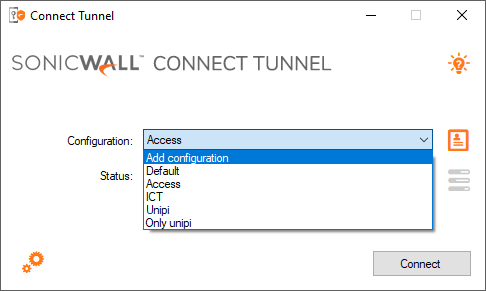
2. Give a name and specify the server address: #
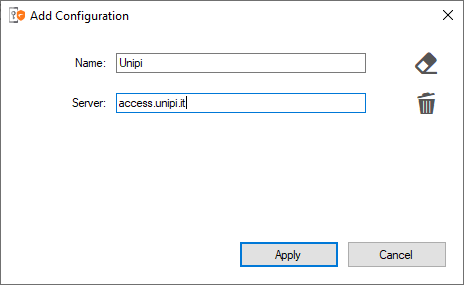
3. Start the connection #
Once the configuration is saved, just select it and press [Connect]. The system will present the terms of service and on the first access, it will ask to select the connection profile.
Connection Profiles #
- Access to UNIPI resources: allows access to the university’s internal resources (servers, network shares, services accessible only from the internal network).
- Internet through UNIPI: enables browsing the Internet using a university IP address (131.114.x.x). Useful for accessing external resources that require the institutional IP (for instance, databases, bibliographic resources, or software with IP licenses). Includes access to internal resources as well.
- External staff: profile dedicated to external users with specific needs. The configuration is done on a case-by-case basis, upon request.
You can check the proper functioning of the VPN by verifying at https://ip.me/ that the displayed IP address begins with 131.114.
Official Documentation #
Further information can be found in the official guide.